The sample code for the Google Client API pages has been updated. It now uses the names of the new Google Client PHP API release and also switched from object – reference to arrays. Finally the source code is available … Continue reading
Tag Archives: php
FastCGI, PHP, Symfony2 with basic auth not working
Just had a little issue that seams to be common in the web. Got a new server with Plesk 11 (sorry for that) and it took me nearly a day to get it working and setup for capifony deployment of Symfony2 projects.
The typical issues with not correctly set access rights for the root directory of the project (should be 755), manually editing of parameters.ini and other stuff was ok. But what nearly killed me was that my Plesk installation always returned a 503 when running PHP as apache module. FastCGI was default and seemed to be working, so I went with this.
Unfortunately this did not work with the admin interface that was running in a “virtual” subdirectory. It was not possible to login. In the background it is using the default, simple, boring and potentially unsecure basic authentification.
Did you know that there is a problem with FastCGI, Symfony2 and basic authentification? I did not, but know I know. It is fixed in the current release (2.0.16) – which is good. But unfortunately there is a RewriteRule that has to be written inside your web/.htaccess. Check the comment in src/symfony/src/Symfony/Component/HttpFoundation/ServerBag.php:
* php-cgi under Apache does not pass HTTP Basic user/pass to PHP by default
* For this workaround to work, add this line to your .htaccess file:
* RewriteRule .* - [E=HTTP_AUTHORIZATION:%{HTTP:Authorization}]
*
* A sample .htaccess file:
* RewriteEngine On
* RewriteRule .* - [E=HTTP_AUTHORIZATION:%{HTTP:Authorization}]
Unfortunately, I tried a different line that was written in the ticket above:
RewriteRule .* - [E=HTTP_AUTHORIZATION:%{HTTP:Authorization},L]
This did not work, but resulted in 401 results for all requests. Just remove the ,l which means that this .htaccess file will be left.
So if you are running a Symfony2 project with FastCGI, add this line to your web/.htaccess file:
RewriteRule .* - [E=HTTP_AUTHORIZATION:%{HTTP:Authorization}]
Google Client API – how to access Google Analytics with PHP
Have you ever tried getting some data out of Google Analytics with PHP? This can be complicated. We provide some tutorials how this can be done easily with the official Google Client API and PHP.
Adsense widget for Geckoboard
enarion.net released a widget to display the revenues from Google Adsense in your Geckoboard.
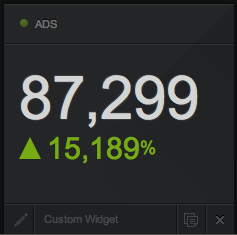 All you have to do is to install the widget code (php-based) on your webserver and add a new custom widget to your Geckoboard widget. Various timespans (including today, yesterday, current month, last month) and values (e.g. ecpm, earnings and clicks) can be selected. Values are extracted in realtime from the Google Adsense account, providing up to the minute information.
The code is released under the GPL license and can be used and modified without charge.
Further information and the download can be found at http://enarion.net/tools/geckoboard-adsense-widget/.
About Geckoboard
You can create, run and share dashboards showing various key / performance values using the webservice Geckoboard. The setup is easy, there are many predefined widgets for various web services including Google Analytics, ZenDesktop, Mailchimp and various more.
About enarion.net
Providing open source tools and development knowledge to the public is the aim of enarion.net. It was founded by Tobias Kluge as home of phpSitemapNG years ago, a tool to generate Google sitemaps.
enarion.net redesigned and a bit refreshed
As you may have realized, enarion.net got a little facelifting. Finally the website runs with WordPress and got a new, cleaner layout.
The content is mostly migrated, only the German and partially Portuguese has been removed. All tools and libraries got a specific section. The content regarding phpSitemapNG has been trimmed.
What do you think about it?